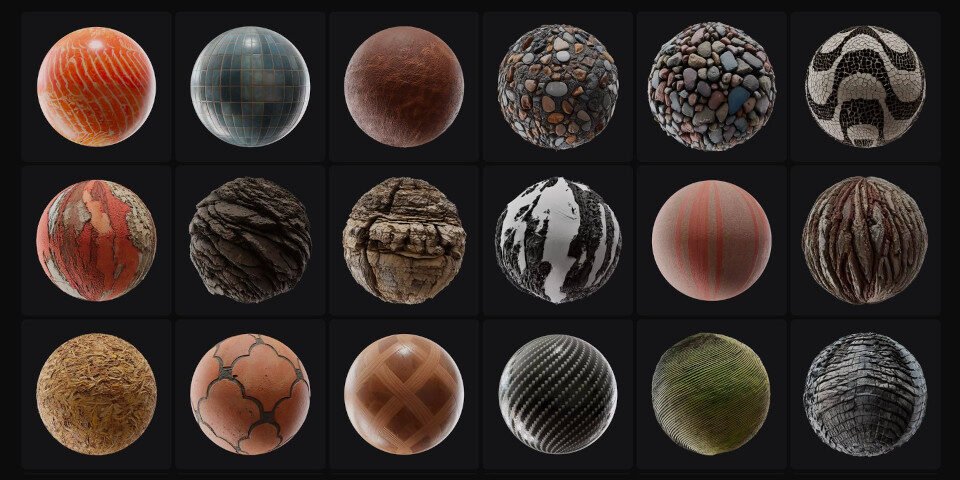
The shimmering fabric of a virtual garment, the worn texture of an ancient ruin in a game, the realistic gleam of a product in an online store – all owe their convincing appearance to highly detailed surface data. Achieving this level of visual fidelity demands Advanced Texture Generation Techniques (PBR, Normal Maps), which have been utterly transformed by the power of Artificial Intelligence. Gone are the days when generating a full suite of physically based rendering (PBR) textures was a labor-intensive, often frustrating, manual process. Today, AI steps in as your digital artist, streamlining the creation of photorealistic materials with unprecedented speed and accuracy.
In this guide, we'll peel back the layers of modern texture generation, exploring the foundational principles of PBR, dissecting the magic of Normal Maps, and revealing how cutting-edge AI is democratizing access to high-quality 3D assets for everyone from game developers to e-commerce entrepreneurs.
At a Glance: Key Takeaways
- PBR is the Gold Standard: Physically Based Rendering (PBR) is the industry benchmark for realistic 3D materials, accurately simulating how light interacts with surfaces.
- Texture Maps are Essential: PBR relies on multiple texture maps (Albedo, Roughness, Normal, Metallic, AO) to define a material's properties.
- Normal Maps are Performance Powerhouses: They add detailed surface bumps and grooves to low-polygon models without increasing geometry, significantly boosting rendering performance.
- AI Revolutionizes Workflow: AI can automatically generate full PBR material sets from a single input photo, a task traditionally requiring extensive manual effort.
- Real-World Applications are Vast: From e-commerce product visualization and game asset creation to architectural rendering and AR/VR experiences, AI-generated textures are proving invaluable.
- Quality & Limitations: AI excels with clear, high-resolution product photos but may require human refinement for stylized assets or complex tiling patterns.
- Advanced Techniques Beyond PBR: Environment maps (cube maps) are crucial for realistic reflections and ambient lighting.
- Optimization is Key: Managing texture resolution, compression, mipmapping, atlases, and streaming ensures smooth performance in any application.
The Foundation of Realism: Understanding PBR Textures
Before we dive into the AI revolution, it's crucial to grasp the bedrock of modern 3D realism: Physically Based Rendering (PBR). Think of PBR not as a single texture, but as a comprehensive approach to defining how light behaves on a surface, grounded in the laws of physics. It allows 3D artists and developers to create materials that look consistent and correct under any lighting condition, a monumental leap from older rendering methods where materials often looked "off" depending on the scene's illumination.
PBR materials achieve this consistency by using several distinct texture maps, each responsible for a specific aspect of how light interacts with the material.
Dissecting the Core PBR Material Maps
Each of these maps plays a vital role in crafting a believable 3D surface:
- Albedo (Base Color): This is the pure, unlit color of your material. Imagine stripping away all shadows and highlights from a surface; what's left is its albedo. It defines the intrinsic color that light reflects from the surface.
- Roughness: This map dictates how smooth or rough a surface appears. A low roughness value results in sharp, mirror-like reflections (think polished chrome), while a high roughness value scatters light more, leading to blurred, diffuse reflections (like matte plastic or concrete). It's a fundamental property for defining visual sheen.
- Normal Map: This is where the magic happens for adding intricate detail without breaking your polygon budget. A normal map simulates bumps, grooves, scratches, or fabric weaves on a low-polygon model. Instead of adding actual geometry, it cleverly tricks the lighting engine into perceiving depth. It stores surface normal vectors (X, Y, Z directions) as RGB color values, telling the renderer how light should bounce off the "simulated" surface. This significantly reduces polygon count, making complex scenes render smoothly.
- Metallic: A binary map that differentiates between metallic (1.0, often white) and non-metallic (0.0, often black) surfaces. Metals behave differently under light – they reflect colored light and have distinct specular highlights. This map guides the renderer to apply the correct physical properties.
- Ambient Occlusion (AO): This map adds soft, contact shadows in crevices, corners, and anywhere light might struggle to reach. It enhances the perception of depth and realism, making objects feel more grounded in their environment.
- Specular Maps: While often replaced or integrated into roughness/metallic workflows in modern PBR, specular maps traditionally control the intensity and color of specular highlights – the bright spots where light reflects directly into the camera. They are typically grayscale, with lighter values indicating more intense shininess.
Normal Maps vs. Bump Maps: A Quick Distinction
You might hear "bump map" used interchangeably with "normal map," but there's a crucial difference in their sophistication:
- Bump Maps are simpler. They use a grayscale image to store height information. The renderer infers depth by checking if a pixel is lighter (higher) or darker (lower) than its neighbors. While effective for subtle bumps, they lack the precision for complex angles and true volumetric illusion.
- Normal Maps, as we discussed, store precise surface normal vectors (X, Y, Z directions) as RGB values. This allows for far more accurate and complex surface details, making objects look genuinely bumpy and dented from various angles, rather than just faking height. For advanced texture generation, normal maps are the clear winner.
Enter AI: Automating Advanced Texture Generation
Traditionally, creating a full set of PBR textures from a single photograph was a painstaking process. It involved manually "unlighting" the image to extract the pure albedo, then painstakingly painting or generating roughness, metallic, and normal maps based on visual cues and artistic judgment. This required significant expertise in specialized software and a deep understanding of PBR principles.
But what if you could feed a regular photograph of a material – say, a brick wall, a piece of wood, or a fabric swatch – into a system, and it automatically spit out a complete, game-ready PBR material set? That's precisely the revolution AI brings to advanced texture generation.
How AI Conjures PBR Materials from a Single Image
AI-powered texture generators leverage sophisticated machine learning models, primarily neural networks, trained on vast datasets of real-world materials and their corresponding PBR maps. This training allows the AI to "understand" material properties in a way that mimics human perception, but at lightning speed and with incredible consistency.
Here's the typical process:
- Image Analysis: The AI first analyzes the input photo, identifying the material, its intrinsic surface properties, existing lighting conditions, and color information. It essentially "sees" the object like a human but dissects it into its fundamental physical components.
- Albedo Extraction: This is a crucial step. AI uses neural networks, trained on millions of material samples, to "de-light" the image. It meticulously removes lighting and shadow information, leaving behind the pure, unadulterated base color (Albedo). This is incredibly difficult to do manually without losing detail.
- Surface Property Prediction: Based on visual cues within the photo, the AI intelligently predicts other key material properties.
- Shiny surfaces suggest low roughness.
- Rough, matte surfaces point to high roughness.
- Metallic objects (like polished steel) are assigned a metallic value close to 1.0.
- The AI even infers surface detail for the normal map from subtle light and shadow variations, simulating bumps and grooves.
- Map Generation: With all the properties understood, the AI then generates all the required PBR texture maps – Albedo, Roughness, Normal, Metallic, and Ambient Occlusion – as high-resolution images (often 2K or 4K). It's like having a team of expert texture artists working instantaneously.
- Export & Integration: The generated maps are then packaged into industry-standard formats (like GLB/GLTF for web, or individual image files) ready for seamless integration into 3D software like Unreal Engine, Unity, Blender, or any PBR-compatible platform.
This automated process dramatically reduces the time and specialized expertise required, opening up advanced texture generation to a much broader audience. It also makes tasks like creating custom Minecraft textures or prototyping new game environments far more efficient for indie developers.
Real-World Impact: Where AI-Powered Textures Shine
The applications for AI-generated textures are vast and rapidly expanding, transforming workflows across multiple industries:
- E-commerce Product Visualization: Imagine converting a simple photo of a shoe or a piece of furniture into a fully interactive 3D model with accurate PBR materials. AI enables e-commerce brands to generate realistic 3D product renders from existing product photos, allowing customers to zoom in, rotate, and truly experience details like fabric weave or wood grain, greatly enhancing the online shopping experience.
- Game Asset Creation: Game developers constantly need new assets. AI can take photos of real-world objects – a brick wall, a rocky terrain, a rusty metal sheet – and instantly convert them into tiling, game-ready PBR textures. This accelerates environment design, props creation, and helps bridge the gap between concept art and in-game visuals.
- Architectural Visualization (ArchViz): Architects and interior designers rely on accurate material representation. AI transforms material samples (e.g., flooring swatches, fabric samples, tile photos) into precise 3D materials for architectural renders. This means clients can preview exact material finishes in a virtual space, ensuring the final build matches their vision precisely.
- AR/VR Experiences: For augmented reality product previews or immersive virtual reality environments, realistic materials are paramount for believability. AI streamlines the creation of physically accurate materials, ensuring that virtual objects appear correct under any real-world or virtual lighting conditions, making AR/VR experiences far more compelling.
Maximizing AI's Potential (and Knowing Its Limits)
While AI is a powerful tool, understanding its strengths and limitations is key to leveraging it effectively for advanced texture generation.
When AI Excels
AI texture generators shine brightest under specific conditions, producing exceptionally realistic and physically accurate materials:
- Product Photos with Clear Materials: Images of single, well-defined materials like fabric, leather, wood, or metal.
- Consistent Lighting: Photos taken with even, diffuse lighting (e.g., in a light box or overcast conditions) allow the AI to more accurately "de-light" the image and extract pure albedo.
- Clean Backgrounds: Simple, uniform backgrounds help the AI isolate the material of interest.
- High-Resolution Input Images (2K+): More detail in the source image translates to higher quality in the generated maps, especially for subtle normal map details.
In these ideal scenarios, AI can save countless hours, providing a solid foundation for your 3D assets that would otherwise require expert manual intervention.
When Manual Creation is Still King
Despite its advancements, AI isn't a silver bullet for every texture challenge:
- Stylized or Artistic Materials: If you're aiming for a highly stylized, non-photorealistic look (e.g., cartoon textures, painterly effects), manual creation or artistic manipulation of AI outputs will likely be necessary. AI is trained on realism.
- Complex Tiling Textures: While AI can generate tiling textures, they may occasionally produce visible seams or repetitive patterns that require manual touch-up in a 3D painting application to ensure seamless repetition across large surfaces.
- Complex Multi-Material Objects: If your input photo features an object made of many distinct materials (e.g., a leather couch with metal studs and wooden legs), the AI may struggle to differentiate and generate separate PBR sets. In such cases, it's often better to photograph or process each material separately.
Think of AI as an incredibly efficient assistant that handles the grunt work, freeing you up to focus on artistic refinement and creative problem-solving.
Beyond the Basics: Advanced Texturing Techniques for Next-Level Realism
While PBR maps are fundamental, truly advanced texture generation involves techniques that push the boundaries of realism, especially when it comes to how objects interact with their environment.
Environment Maps: Capturing the World for Realistic Reflections
Imagine a highly polished metal surface in the real world. It doesn't just reflect light; it reflects the entire room around it. This phenomenon is critical for visual realism, and in 3D, it's achieved with Environment Maps, also known as Reflection Maps or Cube Maps.
Environment maps capture the surrounding environment from a single point in 3D space and project this capture onto the surfaces of your 3D models. They are typically stored as "cube maps," which are essentially six images (one for each face of a cube: front, back, left, right, top, bottom) that together represent a full 360-degree spherical view of the environment.
Why are Environment Maps Crucial?
- Realistic Reflections: For shiny surfaces like glass, polished metal, or wet surfaces, environment maps provide convincing reflections of objects and lighting in the scene, greatly enhancing realism.
- Ambient Lighting: They can also contribute to the overall ambient lighting of a scene, adding subtle color and light bounces that make objects feel more immersed.
- Immersion: By reflecting the scene, models appear integrated rather than isolated, boosting overall visual immersion.
There are generally two types: - Static Environment Maps: Pre-rendered or pre-captured images of a fixed environment. Ideal for backgrounds or objects in unchanging scenes.
- Dynamic Environment Maps: Real-time generated cube maps that update as the camera or objects move, offering truly accurate reflections, though at a higher performance cost. Often used sparingly or for very important reflective surfaces.
Practical Example: Texturing a Metal Helmet
Let's put some of these advanced concepts together by imagining we're texturing a 3D model of a metal helmet:
- AI-Generated Base: We could start by taking a photo of a real metal object (or a material swatch) and use AI to generate the base Albedo, Roughness, Metallic, and AO maps. This gives us a solid PBR foundation for the helmet's primary material.
- Adding Detail with Normal Maps: To give the helmet subtle surface imperfections like small scratches, dents from battles, or the granular texture of brushed metal, we'd apply a detailed Normal Map. This map would simulate these details without adding a single extra polygon, keeping the model lightweight and performant.
- Varying Shininess with Roughness/Specular: To show different states of wear, we'd refine the Roughness Map. Polished areas would have low roughness (sharp reflections), while areas with wear, grime, or a dull finish would have higher roughness (blurred reflections). If using a legacy workflow, a Specular Map might differentiate the intensity of highlights between pristine and worn metal.
- Reflecting the World with Environment Maps: Finally, to make the helmet truly integrate into its scene and realistically reflect its surroundings (the battlefield, a hangar, etc.), we would apply an Environment Map. This map would project the scene's lighting and objects onto the helmet's reflective surface, making it look like it truly belongs in that virtual world.
By combining these advanced techniques – leveraging AI for the base, fine-tuning with precise Normal Maps, and integrating Environment Maps – you can achieve astonishing levels of photorealism.
Optimizing Your Textures for Peak Performance
Creating stunning, high-fidelity textures is only half the battle. For any real-time application – be it games, AR/VR, or interactive web experiences – performance is paramount. Inefficient textures can quickly bog down even the most powerful hardware. Advanced texture generation includes a strong understanding of optimization techniques.
Here are essential strategies for ensuring your textures look great without sacrificing performance:
- Texture Resolution: The Goldilocks Zone
- Always aim for the lowest resolution that maintains acceptable visual quality. A 4K texture on an object far in the distance is wasteful. Use 2K for hero assets, 1K for mid-range, and 512/256 for distant or small details. Tools like Photoshop or GIMP allow easy resizing.
- Texture Compression: Shrinking Without Sacrificing
- Modern engines employ specialized texture compression formats to drastically reduce file size and memory footprint without significant visual loss. Common formats include DXT (for desktop/web), ETC (for mobile), and ASTC (a versatile, high-quality format). Your 3D software or game engine will typically handle this during export or import.
- Mipmapping: Details on Demand
- Mipmapping generates a series of progressively lower-resolution versions of each texture (called "mipmaps"). When an object is far from the camera, the engine automatically uses a smaller mipmap, reducing the amount of texture data processed and preventing aliasing (shimmering) artifacts. This is a crucial optimization enabled by default in most engines.
- Texture Atlases: Consolidating Draw Calls
- A texture atlas combines multiple small textures (e.g., for different parts of a character, or various UI elements) into one larger image. The UV coordinates of the 3D model then point to the specific sections of this atlas. This reduces the number of "draw calls" (commands sent to the GPU to render an object), significantly improving rendering performance, especially for scenes with many small objects.
- Streaming Textures: Loading on Demand
- For very large or complex scenes, streaming textures is a technique where textures are loaded into memory only as they are needed (e.g., when the player approaches a certain area). This helps to reduce initial loading times and manage overall memory usage, ensuring a smoother experience in expansive virtual worlds.
Implementing these optimization techniques is just as crucial as the generation process itself. It ensures that your beautifully crafted PBR and Normal Map textures can be experienced by your audience without performance bottlenecks.
Your Next Steps in Advanced Texture Generation
The world of 3D materials is constantly evolving, with AI continuing to push the boundaries of what's possible. Mastering advanced texture generation techniques, especially PBR and Normal Maps, is no longer just about artistic skill but also about intelligently leveraging powerful tools.
Start by experimenting with AI texture generation platforms. Take photos of everyday objects around you and see the PBR materials they generate. Pay close attention to how the individual maps (Albedo, Roughness, Normal, Metallic, AO) contribute to the final look. Understand when AI is your best friend for speed and realism, and when a human touch is still indispensable for artistic control or fixing specific issues.
Dive deeper into your 3D software of choice (Blender, Unity, Unreal Engine, Substance Painter) and explore how PBR materials are set up, how normal maps are applied, and how environment maps illuminate your scenes. The more you experiment and understand the underlying principles, the more confident and capable you'll become in creating truly compelling and realistic 3D worlds. Embrace the tools, learn the craft, and watch your 3D creations come to life.